Kling AI: AI Image&Video Maker
- 4.5
- Rating
- 10.00M
- Installs
- Free
- Price

 Analysis by App-foxy
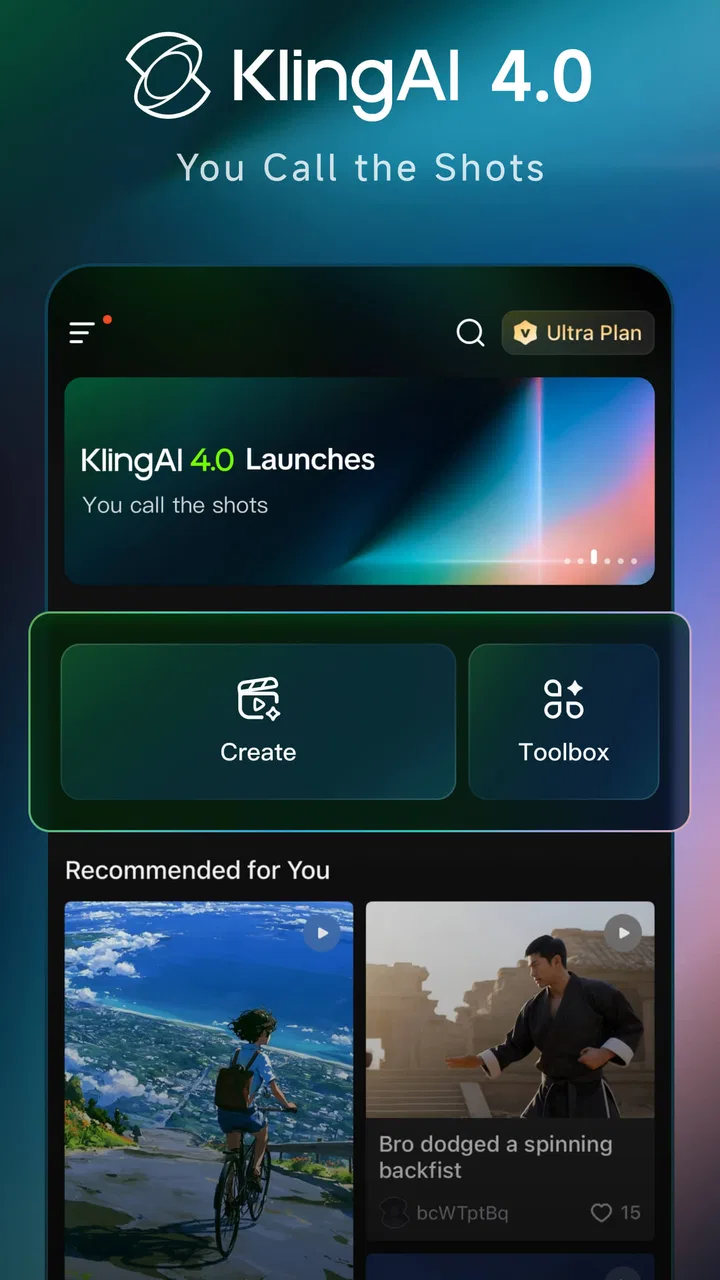
I approached Kling AI as a practical creative tool rather than a novelty generator. It sits in the art and design category, but its appeal reaches beyond people who already think of themselves as artists: I can imagine using it to sketch a visual idea, prepare social content, explore a poster concept, or turn a rough prompt into something worth refining. The app combines image creation, video generation, and editing in one AI-focused studio, which makes it more flexible than a basic image generator.
My first impression is that it is built for experimentation. You describe what you want, inspect the result, adjust the idea, and try again. That loop is exciting when the prompt is clear and the subject is forgiving. It is less satisfying when the request depends on exact lettering, precise object placement, or a character remaining perfectly consistent across several scenes. The app can help me get from a blank page to a visual direction quickly, but I would not treat every output as finished artwork.
That distinction matters. This is best understood as an AI-assisted creative workspace, not a replacement for a full professional design suite. It gives me speed and possibilities, while traditional tools still offer more dependable control over layers, typography, measurements, and detailed retouching.
You May Also Like

 Pandora - Music & Podcasts
Pandora’s Music Is Easy to Start, but Harder to Recover
Pandora’s strength is its low-effort path from a seed to a station. Its weak spot is how much confidence it asks you to place in connection, setup, and quiet recovery.

 AccuWeather: Weather Radar
AccuWeather Review: A Quick, Clear Forecast for Everyday Decisions
For everyday plans, the best forecast is the one you can understand quickly. AccuWeather makes rain timing, radar, and local conditions easy to act on, with a few trade-offs.

 Hill Climb Racing
Why Hill Climb Racing Still Turns Crashes Into One More Run
A tiny car, a bumpy hill and one more upgrade: Hill Climb Racing keeps resurfacing because its simple chaos makes every near-miss feel personal.

 AliExpress - Shopping App
AliExpress Makes Global Shopping Feel Personal, but Shoppers Bear the Risk
AliExpress turns a global marketplace into a pocket-sized discovery engine. Its reach is useful, its shopping loop compelling, and its trade-offs easy to miss.

 Lords Mobile: Kingdom Wars
Lords Mobile Is a Kingdom-Building Routine, Not a Quick Match
A case-by-case verdict on the building, battles, device demands, and social commitments that make Lords Mobile rewarding for some players and exhausting for others.

 PDF Scanner app - TapScanner
TapScanner Makes Paperwork Easier to Capture, Check, and Share
TapScanner makes scanning with a phone feel less like a rescue operation and more like a dependable step in getting work done. Its capture tools are useful, though not flawless.
More From Our News Desk
View All News


How the current version feels in everyday use
I find that the current version is easiest to judge through a small, real task rather than a long session of open-ended prompting. For shared devices, that means agreeing on the project before anyone starts generating: a household event image, for instance, gives each person a clear brief and makes the results easier to compare. That practical routine leads naturally to the question of what changes between versions and how users can stay adaptable.
A broad creative workspace in a mobile format
The current version is 3.1.21.283, and the app feels aimed at people who want several generative tasks in one place. Instead of switching between a separate image generator, video experiment tool, and editor, I can keep those ideas within the same general workflow. That is especially useful on a phone, where moving files between multiple apps quickly becomes tedious.
I would use it in short sessions. For example, if I were planning a small event, I could begin with a mood for the invitation, explore a few visual directions, and then develop a matching motion concept for a social post. The useful part is not simply producing one image. It is being able to compare styles and decide which visual language fits the project before spending time polishing it elsewhere.
The app also makes sense for early-stage brainstorming. When I know the subject but not the presentation, generated variations can reveal options I would not have drawn from memory. A quiet product scene, a dramatic landscape, a stylized character, or an unusual color combination can all serve as starting points. I still need to judge composition and relevance myself, but the blank-canvas problem becomes much smaller.
Where the image workflow helps most
Image generation is most valuable when I treat the prompt as a brief rather than a magic sentence. I get better results by naming the subject, setting, lighting, mood, viewpoint, and intended use. If I want a clean visual for a phone screen, I should say so. If I need room for a headline, I should describe negative space instead of hoping the model guesses it.
A useful workflow is to begin broad and then narrow the direction. First I would test a few distinct concepts rather than repeatedly rewriting a tiny detail. Once one composition feels promising, I would refine the wording around the successful elements. This saves time and makes it easier to recognize whether the problem is the prompt or the underlying idea.
There is also a practical trade-off between visual complexity and reliability. A simple subject with a clear silhouette usually gives me more usable results than a crowded scene containing many people, objects, signs, and actions. The more relationships I ask the model to preserve, the more closely I need to inspect hands, faces, small objects, and background details.
Video generation changes the decision-making process
Video is not merely a longer image. Motion introduces new problems: a subject must remain coherent, movement should make sense, and the scene needs a beginning, middle, or visual purpose. I find the app more useful when I describe one focused action instead of trying to create an entire short film in a single request.
For a realistic everyday scenario, imagine a small business owner preparing a product announcement. I would first create a still concept showing the product in a clean setting, then explore a short motion idea such as a slow reveal, a change in lighting, or a gentle camera movement. The generated clip could become a background element or an idea for a final production. I would not rely on it blindly for exact brand presentation, because small inconsistencies can be distracting when the product must look identical from frame to frame.
This is where the app differs from a conventional video editor. A normal editor gives me predictable trimming, timing, transitions, and placement. Kling AI gives me a faster route to visual motion that I might not know how to film or animate. The two approaches are complementary: use generation for exploration and atmosphere, then use conventional editing when timing and continuity matter.
Editing is most useful after the creative direction is clear
The editing side makes the app more than a one-tap prompt box. I see its strongest role as a bridge between an initial generation and a shareable concept. Rather than starting with a completely empty canvas, I can use an AI result as material to evaluate, reshape, or combine with a broader visual plan.
That does not mean every generated result is ready for publication. I would check whether the framing leaves enough space for text, whether the subject is recognizable at the size where it will appear, and whether the visual style matches the rest of the project. An image that looks impressive full-screen may become confusing when cropped into a small profile image or a vertical social layout.
For design work, I would keep a simple naming habit outside the creative process: save promising variations with notes about the prompt or intended purpose. Generative work can produce many near-duplicates, and without a small amount of organization it becomes difficult to remember why one version worked better than another.
What has changed and what that means for users
When an app like this evolves, I would not assume that an old prompt or familiar sequence will always produce the same result; I would keep useful ideas but check each new output on its own merits. That matters even more when several people share a device, since one person’s preferred style or unfinished experiment can shape what the next user sees. The next section looks at how to make sense of that evolution without treating a version change as a promise of identical results.
A product that has moved beyond a single-purpose experiment
The app was released on January 20, 2025, and the presence of a current 3.1.21.283 version suggests an actively evolving product rather than a static demonstration. I would be cautious about interpreting a version number as proof that every workflow is mature, but it does indicate that users are working with a later iteration of the experience rather than the earliest release.
For someone joining now, that evolution is encouraging because a combined image, video, and editing studio has more room to become useful over time. For an existing user, updates can change the feel of familiar tasks: a prompt may behave differently, an editing step may become easier, or an output may require a new review habit. The practical lesson is to keep a successful workflow flexible instead of depending on one exact wording or one remembered sequence of taps.
I would also avoid judging the app only by its most impressive examples. Product evolution should be measured by how consistently it helps with ordinary creative work. Can I reach a usable direction without endless retries? Can I make a generated result fit a real project? Can I move from image exploration to motion without losing the original idea? Those questions matter more to me than a spectacular one-off result.
What the audience size tells me
The app has a 4.6 average from around 286 thousand ratings and has passed 10 million installs. Those figures show broad interest and a substantial user base, but they do not guarantee that every person will enjoy the same workflow. AI creativity apps attract both casual experimenters and demanding creators, so expectations can vary sharply.
I would read that popularity as a reason to try it, not as a reason to skip personal testing. Someone looking for quick visual inspiration may find immediate value, while a designer who needs exact typography or repeatable brand assets may notice limitations much sooner. The large audience makes the app relevant, but the right question remains whether its generative approach matches the kind of control I need.
How existing users may need to adapt
People who already use the app should think of updates as a reason to revisit their process. If an earlier prompt produced a favorite style, I would keep the underlying description but test it again rather than assuming identical behavior. I would also preserve important source material before making major edits, especially when a generated image has become part of a larger project.
Another adjustment is to separate “idea quality” from “output quality.” A weak first result does not always mean the concept is bad. Sometimes the prompt is overloaded, the requested action is too complicated, or the composition needs a clearer subject. Conversely, a beautiful result may still be unsuitable if it contains errors that only appear when used in context.
That mindset makes the app less frustrating. I am not asking it to read my mind; I am using it to explore a visual space. The more specific the final requirement, the more I should expect a review and refinement stage rather than immediate acceptance.
Where it still falls short
The biggest gap for me is precision. Traditional design applications remain better when I need exact dimensions, dependable alignment, editable layers, carefully controlled text, or a consistent visual system across many assets. An AI-generated image can suggest a poster, but it is not automatically a finished poster with reliable copy and production-ready structure.
Continuity is another concern, especially for video. A generated clip can communicate mood quickly, yet small changes in appearance or movement may limit its use in a sequence. If a project depends on a person, product, or location staying identical across multiple shots, I would compare the results carefully and be prepared to finish the work in a conventional editor.
There is also a cost consideration. The app is free to install, but in-app purchases range from $1.19 to $1,099.99 per item. That wide range means I would pay attention before confirming anything and decide in advance how much experimentation is reasonable for my project. Casual users should not assume that unlimited creative retries are automatically free, while serious users should evaluate whether the paid workflow genuinely saves time.
The Teen content rating is another useful signal for households. I would not treat an age label as a substitute for personal judgment, but parents and younger users should still consider whether AI-generated imagery and video fit their expectations before making the app part of a regular creative routine.
Who should use it, and who should choose something else
I would recommend it to curious creators, social media users, students exploring visual ideas, small teams preparing concepts, and anyone who wants to test image or video directions without learning a complex production pipeline first. It is especially appealing when speed and variety matter more than perfect repeatability.
I would be more hesitant to recommend it as the only tool for a professional identity system, technical illustration, detailed photo correction, or a video project that requires exact continuity. In those cases, a conventional design or editing application is the better foundation, with AI generation used only for references, rough concepts, or selected background material.
It may also be the wrong choice for someone who dislikes iterative prompting. The creative process here involves judging results, rewriting requests, and accepting that some attempts will be unusable. If I want a predictable template-based editor where every control behaves exactly as expected, this kind of generative workflow may feel slower rather than faster.
Questions I would consider before installing
One practical question is whether the app works for a complete beginner. In my view, yes, provided the beginner starts with small goals. I would create a single image with one clear subject, compare a few directions, and only then attempt more ambitious video ideas. The learning curve is less about mastering technical panels and more about learning how to describe visual intent.
Another question is whether it can replace a stock-image library. I would use it when I need a tailored concept that ordinary stock searches may not offer, but I would not assume that every result is suitable for a final commercial asset without careful review. Stock libraries offer predictable files and established search workflows; generation offers customization and surprise.
Users may also wonder whether mobile creation is enough for serious work. For brainstorming, quick drafts, and social content, I think it can be. For detailed finishing, I would still move the chosen result into a tool that gives me stronger control over typography, layout, color adjustments, and export preparation.
Finally, I would ask whether the free entry point is enough for occasional use. It is a sensible way to test the creative workflow, but anyone planning frequent generation should inspect the purchase choices carefully and decide whether the expected value matches the amount of use. The app is most rewarding when I have a clear project or experiment in mind, not when I generate endlessly without a purpose.
What I would watch as the product develops
I would pay close attention to improvements in consistency, controllability, and the handoff between still images and video. Those areas determine whether the app remains mainly an inspiration machine or becomes a dependable part of a repeatable production workflow. Better visual continuity would matter more to me than simply adding more stylistic possibilities.
I would also watch how the current version handles existing projects as the app evolves. A creative tool earns trust when users can understand what changed and keep working without rebuilding everything from scratch. Clearer control over revisions, easier comparison between variations, and dependable editing would all make the generative side more useful in real assignments.
My final view is positive but measured. Kling AI is a compelling free art and design app from Lohas Games Pte. Ltd. for turning descriptions into visual experiments and motion concepts. Its strengths are speed, breadth, and the ability to make the first step feel less intimidating. Its weaknesses appear when I need exact text, stable continuity, or the predictable control of traditional software.
I would install it if I wanted a fast creative partner for ideas, drafts, and visual exploration. I would keep another editor nearby for finishing work, and I would treat every generated result as something to inspect rather than automatically publish. Used that way, the app earns its place: not as a complete replacement for established creative tools, but as a flexible way to discover possibilities I might otherwise never try.
FAQs for Kling AI: AI Image&Video Maker
01What is Kling AI: AI Image&Video Maker?
Kling AI is an innovative app designed to effortlessly create and edit images and videos using advanced AI technology. It provides a range of tools to enhance creativity, allowing users to generate professional-quality content with minimal effort. Ideal for both personal projects and professional use, Kling AI offers a seamless user experience.
02How user-friendly is Kling AI for beginners?
Kling AI is designed with an intuitive interface that caters to both beginners and experienced users. The app includes guided tutorials and easy-to-follow instructions, making it accessible for those with little to no prior experience in image or video editing. Users can quickly grasp the basic features and start creating content immediately.
03What kind of AI features does Kling AI offer?
Kling AI leverages cutting-edge AI technology to offer features such as automatic image enhancement, video editing, and smart filters. It also includes AI-driven suggestions for styles and edits, streamlining the creative process. These features ensure that users can achieve high-quality results with minimal manual intervention.
04Are there any in-app purchases or subscription fees in Kling AI?
While Kling AI offers a range of free features, some advanced tools and functionalities may require in-app purchases or a subscription. Users can choose from various subscription plans to access premium content and features, providing flexibility depending on their needs and budget. It's advisable to review the pricing details within the app before committing.
05Is Kling AI available on both Android and iOS platforms?
Yes, Kling AI is available for download on both Android and iOS platforms, ensuring wide accessibility for users across different devices. The app can be downloaded from the Google Play Store for Android devices and the Apple App Store for iOS devices, making it convenient for users to access and install the app on their device of choice.
Pros
- User-friendly interface enhances creativity.
- High-quality image and video outputs.
- Wide range of customization options.
- Fast processing speeds for quick results.
- Intuitive AI tools simplify editing tasks.
Cons
- Requires a stable internet connection.
- Some features are behind a paywall.
- Occasional minor bugs in video editing.
- Limited support for older devices.
- High storage usage for saved projects.

Kling AI: AI Image&Video Maker
Gallery